
Reddit is a social news aggregation, web content rating, and discussion website based in the United States. Registered users upload content to the site, such as links, text entries, photographs, and videos, which are then rated positively or negatively by other users.
Reddit isn’t anywhere close to Google or Facebook in terms of popularity, but it remains firmly on the list of the world’s most popular websites. The popular network of all communities covers almost any subject and has a large following.
We understand how annoying it can be when Reddit isn’t working. The community is famed for its loyalty, so we can understand how frustrating it can be when Reddit isn’t working.
Reddit app won’t load on Android/iOS isn’t a new problem for Reddit users. The issue arises from time to time. For unknown reasons, the Reddit app becomes stuck loading videos, comments, posts, GIFs, NSFW, and other stuff at random.
The Reddit app occasionally stops loading and says “Sorry, please try again later” or “Sorry, can’t reach Reddit” with no additional explanation. Recently, some users were unable to reload the Reddit app or website.
If you’re one of the numerous users who’s wondering “why is my Reddit app not loading or taking forever to load items and how to fix it,” you’ll find an answer here.
Why is my Reddit app not loading?
The Reddit application may fail to run or load on your most recent smartphone for a variety of reasons, including the use of an older version. The problem might also be caused by a corrupt cache/data or a faulty application installation.
Here are a few additional reasons why the Reddit app does not load.
1. Reddit Down
The first thing to do is to see if Reddit is the only site experiencing issues. Try using another app or going to a different page by opening a browser. If everything else works, Reddit is most likely unavailable.
There are two ways to check if Reddit is down. Redditstatus.com is the major tool for determining whether all systems are operating on the website.
Simply walk in and check the status. You can also file a report if you encounter any problems. There’s also a live map that shows you if Reddit is having any problems in your area.
2. Cached Files
They can also cause issues with the Reddit application. Cached data on your Android smartphone is a collection of temporary files that have gathered over time.
Multiple cache files, on the other hand, can corrupt the programme and cause it to lag. Reddit, like other apps, keeps cache in order to improve performance and user experience.
Please bear in mind that the Reddit app generates a lot of cached data in order to keep things running smoothly.
This is also true if Reddit isn’t working properly in a mobile browser. More caches are created as a result of frequent browsing based on the data on the website.
3. Outdated Version
One of the main reasons you’re having issues with the Reddit software on your Android device could be that you’re using an older version of it. The Reddit application is often updated to address reported bugs.
The application may not load properly if you are using an old version of Reddit. Upgrading the Reddit application may be the solution in this scenario.
4. Outage on Servers
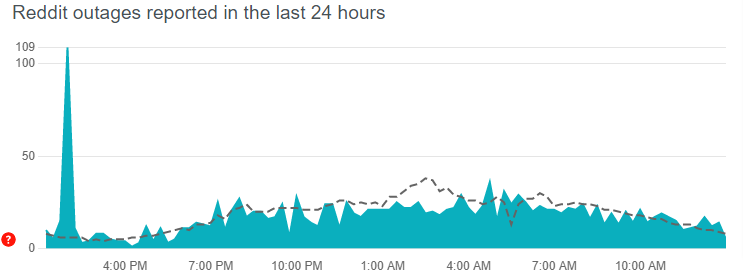
It is always possible that there is a technical problem at work. Due to server failures, apps are sometimes unable to load. Overcapacity or an internal malfunction can cause widespread outages, leaving us without Reddit for several hours.
You can also trace these outages if you suspect this is the source of the problem.
5. Ad Blocking
Disabling advertisements on the Reddit app does not sit well with the app, since it leads to the app’s dysfunction. Make sure your ad blocker is switched off when using the Reddit app or your mobile browser. This could be one of the reasons why your Reddit app isn’t loading.
6. Bugs in the System
In the computer world, a bug is an error in a software programme. It may cause the software to crash or act erratically.
These system-wide defects can occasionally interfere with the operation of third-party programme processes, resulting in issues such as the Reddit app not loading.
We’ll try to look into every possibility and remove them one by one. This is the most effective technique to resolve the Reddit not working on Android issue, allowing you to continue exploring the top page of the internet without interruption.
Whatever the case may be, we have provided you with viable choices to assist you in dealing with this issue. So, without further ado, let’s get started with our instruction on how to fix Reddit.
How do I fix Reddit app not loading on mobile?
Whatever the issue is, this is the complete way to resolving it and getting rid of the Reddit app not loading on Android problem. Before you begin troubleshooting, ensure that your Wi-Fi or cellular data is operational.
Also, ensure that you are not using the beta version of the application and that you are not using special characters in your username and password. After you have double-checked all of these facts, move on to the solutions listed below.
1. Verify your Internet connection.
If the Reddit app or website isn’t loading, check to see if your Internet connection isn’t malfunctioning. It’s possible that you’re having issues with your Wi-Fi or mobile data plan.
Simply opening another site in your PC or phone browser will allow you to determine if the problem is with the connection. If nothing appears to be loading, it is most likely due to a problem with your Internet connection.
In most cases, rebooting your router solves the problem. If it doesn’t work, we have a troubleshooting guide that you should look at. You could also double-check that you haven’t forgotten to pay your payment or that your internet service isn’t out of commission.
If you’re using cellular data, you should check to verify if your data connection is active:
- Open the Settings app.
- Navigate to Network and Internet.
- Select the Mobile network.
- Turn mobile data on.
- If you’re travelling outside of your country or network’s coverage area, enable Roaming as well (this may incur extra charges).
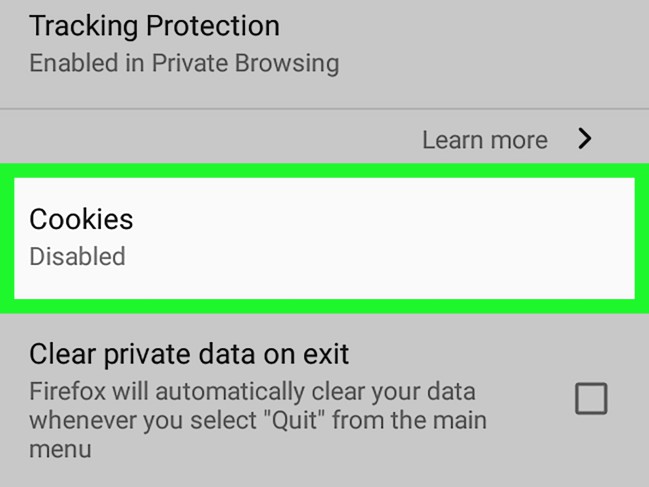
2. Attempt to clear your cookies.
If it only works in one browser and not the other, try deleting your cookies in that browser.
In Chrome, for example, go to the menu icon (three dots) and pick Settings, then click “Show advanced settings.” You seek “Content Settings” under “Privacy.” Then, in the Cookies section, pick “All cookies and site data,” followed by the “Remove all” button.