
Are you not able to use Hulu application?
Or getting the error “your account does not have access to the HULU application”?
If that’s the case, you have landed on the right page.
Here, we have explained all you need to know why you can’t access Hulu application and how to fix it.
So, let’s get started.
Hulu is a growing streaming platform with the majority of the stakes owned by Disney and the minority of it owned by NBC Universal.
Joining the likes of Netflix, Amazon Prime Video, and Disney+ it offers live TV with original content too. With a wide range of movies, series and live TV offered to the users, Hulu is rapidly gaining popularity.
Hulu offers content from various TV networks like Discovery, Showtime, BBC, The CW, CBS, ABC, Fox Sports and multiple others.
According to statistics, Hulu has 39.4 million subscribers with a total viewership of 99.7 million. With its critical acclaim, the numbers are expected to grow steadily in the near future.
What does it mean when it says, “your account does not have access to the HULU application”?
Generally, this error is displayed when the account under question is recognized, but the application software version or the version of the device should be updated.
There are a good deal of reasons for why this error is being shown. It might be due to the cache, the server might be out of order for a while, network errors and several such reasons.
Nothing is perfect at all times, so we might face problems with the application, or it might not work as desired.
Let us dive in and resolve the issue you are facing using the methods mentioned below.

How to fix “your account does not have access to the HULU application”?
There are a plethora of reasons Hulu shows this error. Let us look at the reasons and methods to fix it.
1 – Make sure your Hulu account isn’t expired
The first step before moving to troubleshoot steps is to make sure that your Hulu account isn’t expired or cancelled.
If your account isn’t active, you won’t be able to access it.
So, make sure your Hulu subscription is active. Check your email for any notifications or messages indicating that your account has expired.
2 – Check your internet connectivity
A low or an absence of internet connectivity can be the cause of “you do not have access to the application” issue.
Check that your Wi-Fi or cellular data is turned on.
If you are using Wi-Fi, ensure that the Wi-Fi symbol does not have an exclamation mark beside it, try to check your Wi-Fi connection and turn the router OFF and ON again. If that does not solve it, please contact your Internet Service Provider (ISP).
If you are using cellular data, make sure it is on and displaying two arrows blinking in the opposite direction, with a H+, 2G, 3G or 4G beside it.
3 – Check the HULU server status
Servers of major websites and applications are updated frequently and this makes the website/ application in question down for a while.
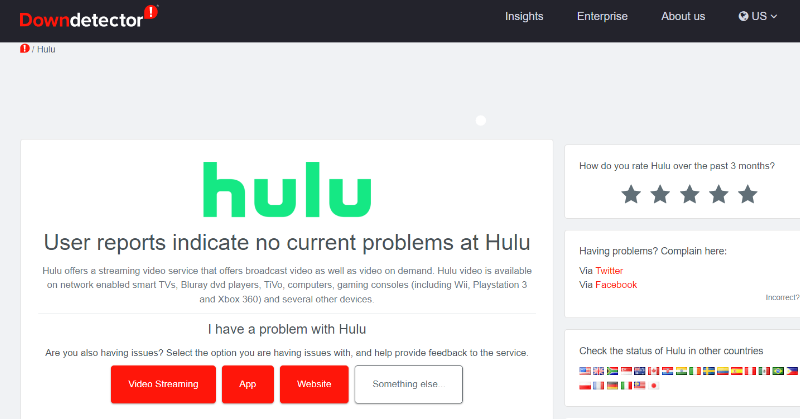
Or sometimes, the server’s downtime is due to a large traffic (users who visit the website/application). To check whether the server is functional or not, use https://downdetector.com. The image below tells us that the server is up and running.