

Let us first begin with a short brief of the Apple Tv app before getting onto the main topic of the article, i.e How to Fix Apple TV video not available on your device.
Apple TV is basically a vast hub for all the content you enjoy watching on different TV and movie applications – like Hulu, Showtime, HBO max, Roku, Youtube, etc. And lets you run it all from one convenient location.
As a result, when you are confused about what you want to watch, this helps you to avoid the need to open several different apps.
You can watch various Apple Original shows and movies from Apple TV+ (the app). There are thousands of movies to buy or rent. It provides you with prominent and popular streaming services.
It is all available on the expertly curated Apple TV app, and it’s everywhere. Be it your favorite Apple devices, streaming platforms, smart TVs, gaming system/consoles, and many more. It is the ultimate way to watch TV.
The Apple TV app is already on your favorite Apple devices, as well as streaming platforms, popular smart TVs, gaming systems/consoles, and AirPlay‑enabled devices. Just open the app and enjoy watching it on your big screen, such as Samsung smart Tv, Roku, FireTv, etc.
Editors’ picks are also available for you to choose from. With Watch Now, you can easily browse or explore some freshly brewed recommendations and hand-picked content by their editors that will help you discover what is best to watch on your holiday.
How To Get Started?
- Go to your device’s app store and download the Apple TV app or Apple TV+ app
- Open the Apple TV app or Apple TV+ app and choose Start Watching.
- Go to Settings > then select Accounts.
- Choose Sign In and continue
As soon as you launch your Apple TV, you will see a section entitled Up Next that displays everything you have seen so far. When you choose the content you wish to see, Apple TV immediately begins playing it and launches the necessary app.
For instance, if you have been watching your favorite comic or rom-com series on the HBO max app, you can launch your Apple TV and opt for the episode you are currently watching.
Your Apple TV will then launch HBO max and immediately start playback from where you left off. You can always get back to the Apple TV app by pressing the TV button on your Siri remote/Apple Tv remote.
Your Apple Tv is of utmost importance if you have a get-together at your place. And if it does not work properly, you will be embarrassed to the core in front of your family and friends, and we won’t let that happen to you. Let us begin with the reasons behind the issue first and then Fix Apple TV video not available error.
Why does my Apple TV keep saying video not available?
Reason 1: Internet Connectivity Issue
This problem may occur if your internet connection is not fast or is inconsistent. This is considered as one of the most popular reasons why you may be seeing the ‘Video Unavailable’ message on Apple TV+(the app). So, to prevent the issue make sure your device is turned on and connected to the respected Wi-fi/cellular data.
Also, if multiple devices are connected to your hotspot/internet, your connection speed might slow down. You are suggested to temporarily pause their internet connection.
Reason 2: Outdated Version
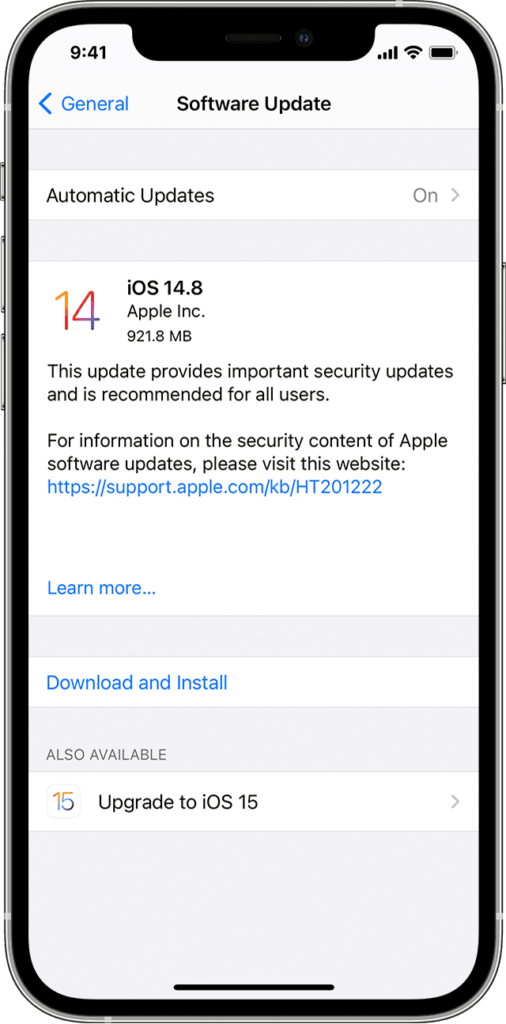
Nowadays, keeping the device and app up-to-date is very significant to prevent any kind of issue. In case, you are using a compatible smart TV, streaming device, or gaming system/console that is connected to the internet, the Apple TV app should be updated automatically, or you can go to the app store and do it yourself.
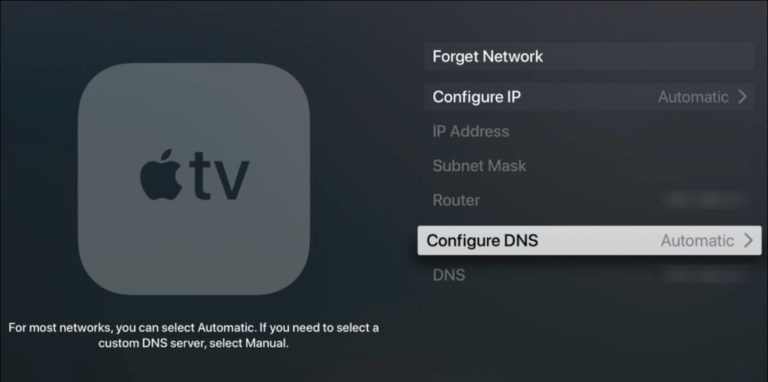
Reason 3: Check DNS Settings
DNS (Domain Name Service) is the application service that translates the IP address into a more recognized and memorable name. A wrong DNS server on your device means that you are not able to find the video file address on the Apple TV server.
Reason 4: Wrong Apple ID
In case, you are using more than one Apple ID then there is a great possibility that the Apple ID you used to sign in to your Apple TV app is the incorrect one.
One possible example is that you have purchased the shows or movies using your primary Apple ID. In that case, you will not be able to view those videos on your Apple TV app if you are signed in to your secondary Apple ID account.
Reason 5: Streaming Multiple Devices
If other people are streaming Apple TV+ or Apple TV channels simultaneously, make sure that they do not exceed the streaming limits for multiple devices.
SEE ALSO: Why is there no App Store on my Apple TV?
How to Fix Apple TV video not available?
If you are having trouble streaming, watching, or starting a movie or TV show that you purchased over a Wi-Fi or cellular connection, try attempting the steps mentioned below. After each step, try to stream or download the movie or TV show again and check if you can play the video.
Method 1: Boost Your Internet Connection
It is the most common problem and the most annoying one. If your cellular connection is poor, try connecting to the Wi-fi. If there are multiple people on your network who are using the internet, the connection speed might slow down. Ask them to temporarily stop using the internet for better connectivity.
Method 2: Use Updated Version
Update to the latest version of the Apple TV app, i.e, the latest version of iOS or iPadOS, macOS, or tvOS.
If you are using a compatible smart TV, streaming device, or gaming console that is connected to the internet, the Apple TV app should update automatically.
Go to Settings > General, then tap Software Update.