Is your Vizio TV connected to Wi-Fi but no network detected?
Are you facing a Vizio no network detected issue? Surely Vizio produces great TVs, but they are prone to getting issues and bugs just like other brands too. Rather than deciding to change the TV, you should try some fixes first. Hopefully, they would work out successfully for you.
There are various reasons why this could have happened. This article focuses on what it is, how it happens, and how you can fix it. Along with the guide, I would also be dropping some links to fix other Vizio TV issues so keep on reading!
When your Vizio TV writes no network detected this means it is unable to detect a source through which an active internet connection can be established. This either means your TV cannot detect your Network source due to an issue, or you do not have a valid network or working network source. This might be because of your faulty Wi-Fi connection, encryption isn’t Enabled, issues with DNS Configuration, weak signal strength, other device interfering connectivity, etc.
Well, don’t worry, below we have provided all the ways to fix the issue.
How to fix Vizio TV no network detected (Not connecting to Wi-Fi)
There are quite a few quick and easy fixes we can try.
1. Soft Power cycle Vizio TV
This option is found in the Admin and Reset settings and helps in rebooting the Television. How is it different from the normal reboot? Well, it has been tuned to perform an advanced reboot by clearing any persisting code.
Rebooting is one of the easiest methods to try because of its direct and simple approach. You should always try rebooting anything first if losing unsaved data is not a concern.
There is a good chance your Wi-Fi was either turned off or on Hidden. Alternatively, you might have changed the password and the TV was unable to connect to it. For all of these, you would need to turn on your Wi-Fi and establish the connection again.
Always try to update your Wi-Fi’s password whenever you update it so that the TV does not fail to connect to it. You should also reboot your Wi-Fi Router if it is not showing on the TV.
Restart your Wi-Fi router:
Sometimes, simply restarting the Wi-Fi router fixes many issues with the network, especially when the router is working continuously for weeks.
So, simply turn off the router and turn it on the back after 5–10 minutes.
Now, check whether the internet is working on TV or not.
Check Internet speed:
If your Vizio TV is connected to the Wi-Fi but says no network detected, the reason is that your internet is having issues.
In this case, you can check your Wi-Fi speed on your PC, or mobile.
Simply, visit fast.com and check your internet speed.
If the speed is too low, contact your service provider, and once that is fixed, try using Wi-Fi on your TV, and it should now work.
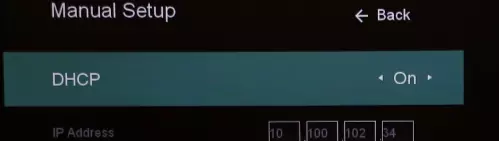
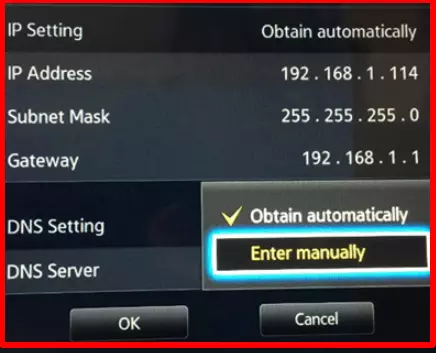
You can head to the settings to check if the DHCP is enabled on your TV. If it is, turn it off and then turn it on again. In case it is turned off then you should turn it on.
DHCP (Dynamic Host Configuration Protocol)plays an important role in establishing a network connection. If it was turned off or not working that might a good reason for Vizio TV no network detected issue.
First, access the TV remote Menu and navigate to Network > Manual Setup. Then, enable DHCP, or disable and re-enable it if it’s already enabled.
Finally, check if your Wi-Fi network appears under Network > Network connection > Wireless Network. If it doesn’t, conduct a quick connection test via Network > Test Connection.
4. Make sure WPA-PSK [TKIP] Encryption is enabled
Another reason why Vizio TV may not connect to the network could be that WPA-PSK [TKIP] Encryption isn’t enabled.
Follow the steps below to enable it.
Login to your router’s portal of your service provider.
Go to your Settings.
On Settings page, click on the option WPA-PSK [TKIP] Encryption.
Now, enable or turn on WPA-PSK [TKIP] Encryption, if not already.
Once the Encryption is enabled, your Vizio TV should be able to detect the Wi-Fi and get connected to the network.
5. Make sure other devices aren’t interfering with connectivity
Another reason why your Vizio TV keeps saying no network detected could be that other devices are interfering with its connectivity.
If you have a lot of devices such as mobile phones, laptops, and other smart devices connected to the same Wi-Fi, then your TV might find it difficult to connect to the network.
So, in this case, you can simply turn off the Wi-Fi on the devices which you are not using currently.
Doing this will make sure that there is minimal interference between your TV and Wi-Fi.
6. Update your Vizio TV
Moving on, another reason why Vizio TV says no network detected could be that it is not updated to the latest software.
If your TV is not running on the latest software, it might have certain underlying bugs or issues causing certain issues such as no network detected issue.
So, make sure the TV is updated to the latest version.
Sometimes the issue might not be just from your end. When your Vizio TV is connected to Wi-Fi, but no network is detected, the problem may be with your ISP.
So, in this case, contact your ISP, and they might be able to fix the issue.
9. Factory Reset Vizio TV
Note: Resetting your TV will delete any settings you have changed and data you have entered.
*Follow the steps below to reset Vizio TV:
Using the VIZIO remote, press the Menu button.
Use the Arrow buttons on the remote to highlight the System and press OK.
Highlight Reset & Admin and press OK.
Highlight Reset TV to Factory Defaults and press OK.
If you have not manually reset the parental code, please input 0 0 0 0 when it asks for the password.
For someone who is a Medical School student, you certainly did not expect me to be here. But here I am, due to my fondness for technology, games and science. There is just something really sweet about technology that has helped in binding us together, so it is not surprising that I love to talk about it. And with the same technology, you could connect with me easily, so feel free to!
For someone who is a Medical School student, you certainly did not expect me to be here. But here I am, due to my fondness for technology, games and science. There is just something really sweet about technology that has helped in binding us together, so it is not surprising that I love to talk about it. And with the same technology, you could connect with me easily, so feel free to!