

The first developer beta is live. Here’s when the public beta drops — and step-by-step instructions to install it on your iPhone today.
⚡ Quick Answer
The iOS 27 Developer Beta 1 released on June 8, 2026 — right after the WWDC keynote (~1:00 PM PT). Install it via Settings → General → Software Update → Beta Updates. No paid developer account needed. The public beta arrives in mid-July 2026.
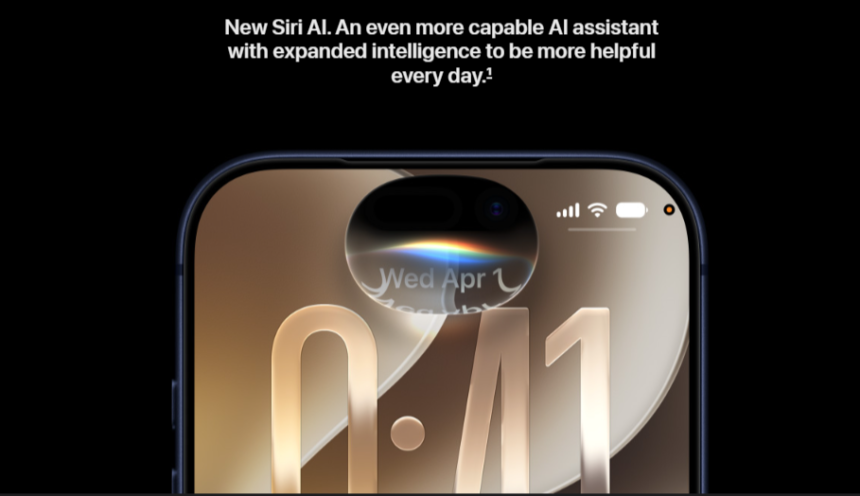
Apple officially unveiled iOS 27 at WWDC 2026 on June 8 — and the first developer beta dropped the same afternoon. Packed with a rebuilt Siri AI, deeper Apple Intelligence features, and major performance upgrades, iOS 27 is shaping up to be one of Apple’s most significant updates in years.
If you want to try it before September, here’s everything you need: the exact release timeline, supported devices, and a step-by-step guide to downloading the beta right now.
📋 In This Article
iOS 27 Beta Release Timeline
Apple follows a consistent annual schedule. Here’s where iOS 27 stands right now:
✔ Live Now
Released same afternoon as the WWDC keynote. Free for anyone with an Apple ID. Install directly via Settings.
Upcoming
Apple typically ships 7–10 developer betas total before the public release, each patching bugs and adding polish.
Mid-July 2026
Free for everyone at beta.apple.com. More stable than the developer beta. This is the version most regular users should wait for.
September 2026
Stable public release for all supported iPhones, alongside the iPhone 18 launch event. Free OTA update.
| Release | Date | Who Can Install | Stability |
|---|---|---|---|
| Developer Beta 1 | June 8, 2026 ✔ Live | Anyone (free Apple ID) | ⚠️ Buggy |
| Developer Betas 2–8+ | Every 1–2 weeks | Anyone (free Apple ID) | ⚠️ Improving |
| Public Beta 1 | Mid-July 2026 | Everyone (beta.apple.com) | 🟡 Moderate |
| iOS 27 Full Release | ~Sep 14, 2026 | All supported iPhones | ✔ Stable |
How to Download iOS 27 Developer Beta Live Now
The developer beta is available right now — and unlike in previous years, you no longer need a paid Apple Developer account. A free Apple ID is all it takes.
Back up your iPhone firstGo to Settings → [Your Name] → iCloud → iCloud Backup → Back Up Now. Beta software can have bugs — always have a backup.
Open Settings on your iPhoneMake sure your iPhone is on iOS 18 or later before proceeding.
Go to General → Software UpdateTap Software Update from the General menu.
Tap “Beta Updates”You’ll see a Beta Updates option at the top of the Software Update screen.
Select “iOS 27 Developer Beta”Choose it from the list and tap Done.
Tap “Download and Install”The iOS 27 beta will download. Your iPhone will restart once during installation — that’s normal.
How to Download iOS 27 Public Beta Mid-July 2026
The public beta is the recommended option for everyday iPhone users who want to try iOS 27 early. It’s more stable, completely free, and requires no developer account.
Back up your iPhoneAlways back up before installing any beta — go to Settings → [Your Name] → iCloud → iCloud Backup.
Visit beta.apple.com on your iPhoneOpen Safari and go to beta.apple.com. Sign in with your Apple ID.
Enroll your deviceTap “Enroll Your Devices” and follow the on-screen steps for iOS.
Go to Settings → General → Software UpdateOnce enrolled, the iOS 27 Public Beta will appear here automatically.
Tap “Download and Install”Your iPhone will download and install the iOS 27 public beta and restart.
Compatible iPhones & Apple Intelligence Requirements
iOS 27 supports iPhone 11 and newer — that’s about 34 iPhone models. However, the new Apple Intelligence features (AI Siri, Writing Tools, Image Playground) require a more recent chip.
| iPhone | iOS 27 Support | Apple Intelligence |
|---|---|---|
| iPhone 17 series | ✔ Yes | ✔ Full support |
| iPhone 16 / 16 Plus / 16 Pro / 16 Pro Max / 16e | ✔ Yes | ✔ Full support |
| iPhone 15 Pro / 15 Pro Max | ✔ Yes | ✔ Full support |
| iPhone 15 / 15 Plus | ✔ Yes | ✘ Not supported |
| iPhone 12 / 13 / 14 series | ✔ Yes | ✘ Not supported |
| iPhone SE (3rd gen) | ✔ Yes | ✘ Not supported |
| iPhone 11 series | ✔ Yes | ✘ Not supported |
| iPhone X / XS / XR / 11 and older | ✘ Not supported | ✘ Not supported |
iOS 27 Key New Features
Here’s what Apple announced at WWDC 2026 — the highlights worth knowing before you install the beta:
| Feature | What It Does | Requires |
|---|---|---|
| Siri AI (Siri 2.0) | Full conversational AI assistant — contextually aware, multi-modal (text, audio, images, video), can read your messages, emails, and files | iPhone 15 Pro+ |
| Standalone Siri App | A dedicated app to hold, search, and continue past Siri conversations | iPhone 15 Pro+ |
| Dynamic Island Search Panel | “Search or Ask” quick-access panel launched directly from the Dynamic Island | iPhone 14 Pro+ |
| Visual Intelligence in Camera | Point your camera at anything and instantly get Siri-powered information about it | iPhone 15 Pro+ |
| Performance Upgrades | Core system functions up to 30% faster; newly captured photos appear in library up to 70% faster | All iPhones |
| Enhanced Parental Controls | Apple Time Allowance and expanded Child Account tools for families | All iPhones |
| Create a Pass in Wallet | Scan physical tickets, cards, and passes directly into Apple Wallet | All iPhones |
| Improved Maps Flyover | Richer aerial imagery in Apple Maps; iCloud Shared Albums support for Android and Windows | All iPhones |
Developer Beta vs Public Beta: Which Should You Install?
| Developer Beta | Public Beta | |
|---|---|---|
| Available | Now (June 8) | Mid-July 2026 |
| Cost | Free (Apple ID) | Free (beta.apple.com) |
| Stability | More bugs expected | More stable |
| Best For | Developers, tech enthusiasts, secondary devices | Everyday users, primary iPhones |
| Our Recommendation | Only if you’re comfortable with bugs | ✔ Best choice for most people |
Frequently Asked Questions
🎯 Quick Recap
- Developer Beta 1: Live now (June 8) — Settings → General → Software Update → Beta Updates
- Public Beta: Mid-July 2026 — enroll free at beta.apple.com
- Full Release: ~September 14, 2026 (free OTA for all)
- Compatible iPhones: iPhone 11 and newer (iPhone X and older: not supported)
- Apple Intelligence (AI Siri): iPhone 15 Pro or newer only
- Our advice: Back up first. Average users should wait for the public beta in July.

Ankit is an engineer by profession and blogger by passion. He is passionate to do all the stuff such as designing the website, doing the SEO, researching for the content, writing tech blog posts and more.


